pfsense NGINX reverse proxy acts as an intermediary gateway that receives incoming client requests from the internet and routes them to one or more backend servers. hidden backend web services, avoid direct access the backend web, avoid PHP vulnerability, avoid http hacks
It is widely used to handle SSL encryption (HTTPS termination), balance server traffic, cache static content, and hide internal infrastructure from public internet.
Running a reverse proxy on pfSense consolidates your firewall security, traffic routing, and SSL management onto a single network edge device.

Key Benefits
-
Reduced Attack Surface: You only need to open ports
80and443on your WAN interface, rather than forwarding dozens of random high-numbered ports (like8080,8123, or32400) directly to internal servers. - Centralized SSL/TLS Offloading: Using the Netgate/pfsense package with HAProxy, pfSense automatically handles Let's Encrypt certificate generation and renewals in one place. Your internal apps don't need individual SSL configurations, and pfSense handles the encryption overhead.
- Tighter Firewall Integration: Because the proxy sits directly on the gateway, you can easily pair incoming web requests with pfSense security tools like pfBlockerNG (for GeoIP blocking and IP reputation lists) or Suricata/Snort (for Intrusion Detection and Prevention) before traffic ever touches your LAN.
-
Clean Subdomain Routing: You can map memorable subdomains (e.g.,
://yourdomain.comor://yourdomain.com) to different internal IP addresses and ports without typing port numbers in your browser. - Eliminates NAT Reflection Issues: By using split DNS (Host Overrides in pfSense's DNS Resolver) to point your domain to the internal proxy IP, local devices can access your services using the same HTTPS URLs without looping traffic out to the internet and back.
- No Extra Hardware or VMs Required: You avoid spinning up, securing, and updating a separate Proxy Server, just to route web traffic via Netgate/pfsense itself.
- Hidden backend Web infrastructure, avoid potential vulnerabilities, no direct Apache/PHP access
Running a reverse proxy directly on pfSense centralizes network security, traffic inspection, and SSL management on a single edge device without requiring extra servers.
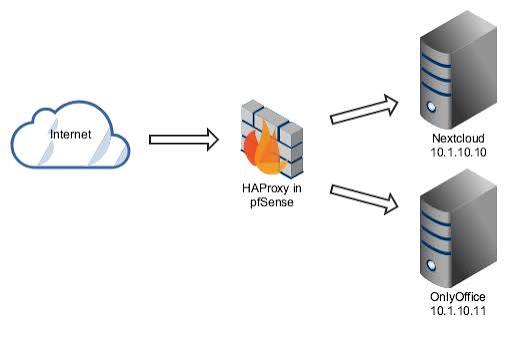
Netgate/pfsense Reverse Proxy Advantage
While the general advantages of any reverse proxy include port consolidation and clean subdomain routing, hosting it specifically on pfSense (via HAProxy) provides unique architectural advantages.
1. Edge-Level Security & Threat Filtering
- Pre-LAN Traffic Inspection: Because pfSense sits at the network perimeter, incoming web requests are filtered by firewall rules, pfBlockerNG (GeoIP and malicious IP blocklists), and Suricata/Snort (IDS/IPS) before the traffic ever enters your internal LAN or hits a backend server.
- No Internal Port Forwarding: With an external proxy (like Nginx Proxy Manager on a Docker host), you must poke a hole through your firewall using NAT port forwarding into your LAN. Hosting HAProxy on pfSense keeps traffic terminated right at the gateway, reducing lateral movement risks if a web service is targeted.
2. Native Network Integration
- Seamless Split DNS: pfSense already runs your local DNS Resolver (Unbound). You can easily create Host Overrides on the exact same machine so internal devices resolve your public subdomains directly to pfSense's LAN IP, avoiding hairpin NAT (NAT reflection) bottlenecks.
- Unified Certificate Management: Combining the ACME package with HAProxy lets your router handle automated Let's Encrypt wildcard certificates and TLS offloading in one interface. Your internal apps don't need individual SSL setups or exposed ports.
3. Infrastructure & Hardware Efficiency
- Zero Additional Compute Overhead: You don't have to spin up, patch, back up, or monitor a separate Linux VM, Raspberry Pi, or Docker stack just to route HTTP/HTTPS traffic.
- High Availability (HA) Ready: If you run a dual-pfSense CARP failover cluster, your HAProxy configuration and SSL certificates automatically sync across both firewalls, giving you enterprise-grade reverse proxy failover out of the box.
4. Enterprise-Grade Routing & Load Balancing
- Advanced Traffic Control: Unlike basic proxy GUIs, pfSense's HAProxy package supports complex Access Control Lists (ACLs)—allowing you to route traffic based on URL paths, source IP addresses, custom HTTP headers, or client certificates.
- Built-in Load Balancing & Health Checks: If you host multiple instances of an app, pfSense can actively monitor backend server health and distribute incoming requests across them automatically.